⚠️ URGENT: PayPal Security Breach in Arknights Endfield - Evidence & Warnings
⚠️ URGENT SECURITY ALERT: PayPal Payments in Arknights Endfield
UPDATE: Gryphline has temporarily DISABLED PayPal payments following severe security reports.
If you are planning to spend money in Arknights: Endfield, STOP and read this first. A critical security vulnerability has been discovered in the PC client's PayPal integration, putting your personal information and funds at risk.
The Evidence: What is Happening?
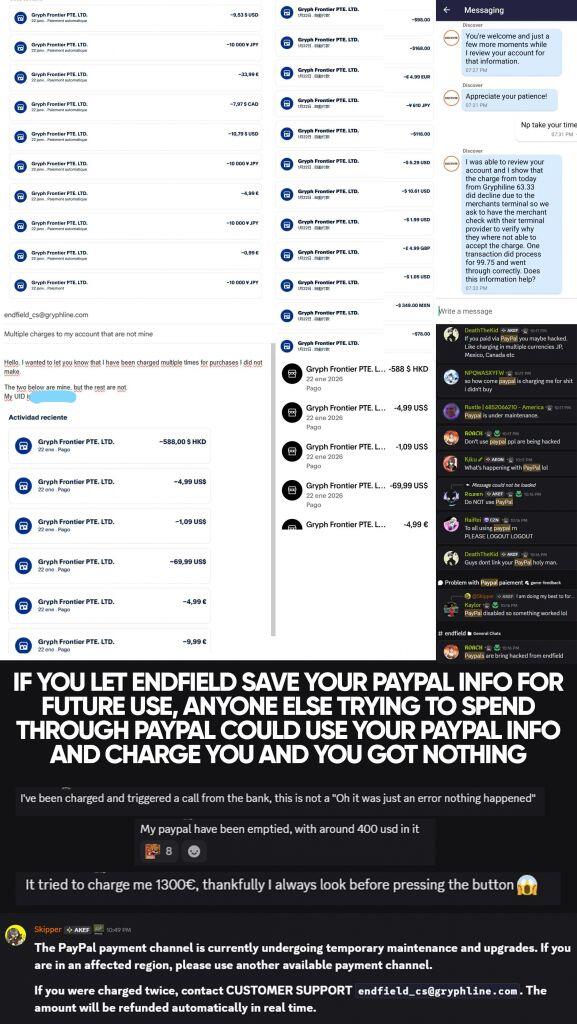
We have collected evidence from the community showing catastrophic failures in the payment system. As seen in the screenshot below, players are experiencing:
- Unauthorized Charges: Users reporting their PayPal accounts being "emptied" with multiple unauthorized transactions.
- Cross-Account Leaks: Some players reported seeing other users' transaction details or being charged for someone else's purchase.
- Massive Overcharges: One user reported an attempted charge of €1300 for a simple purchase.
Evidence from community reports showing multiple unauthorized charges and support tickets.
"My PayPal have been emptied... It tried to charge me 1300€, thankfully I always look before pressing the button." — Player Report
Official Response
Publisher Gryphline has acknowledged the severity of the situation. In response to the wave of reports, they have removed the PayPal option from the payment gateway.
Official support channels have stated:
"The PayPal payment channel is currently undergoing temporary maintenance... If you were charged twice, contact CUSTOMER SUPPORT. The amount will be refunded automatically."
IMMEDIATE ACTION REQUIRED
If You Used PayPal Recently:
- Check Your Bank Statement: Log in to PayPal immediately. Look for any transaction from "Gryph Frontier PTE. LTD." that you did not authorize.
- Remove Authorization: Go to PayPal Settings > Payments > Manage Automatic Payments, and cancel any active agreement with Gryphline/Hypergryph to prevent future auto-deductions.
- Contact Support: If you lost money, email
endfield_cs@gryphline.comwith your UID and transaction proofs. Do not chargeback via PayPal yet, as this may ban your game account.
Safe Payment Alternatives
Until this is officially resolved, DO NOT use PayPal. We recommend:
- Epic Games Store: Uses Epic's own secure payment processor.
- Credit Card: Direct card payments appear to be unaffected by this specific glitch.
- Mobile Top-Up: Payments via iOS/Android are secure.
Summary
This is not a drill. The PayPal integration in the current PC client build has a critical flaw. Protect your wallet and stick to official store platforms (Epic/iOS/Google) for now.